Medical stamps, and what a doctor seal has to carry
28 August 2026 · Estamplab
Make your stamp free · Browse 225 templates

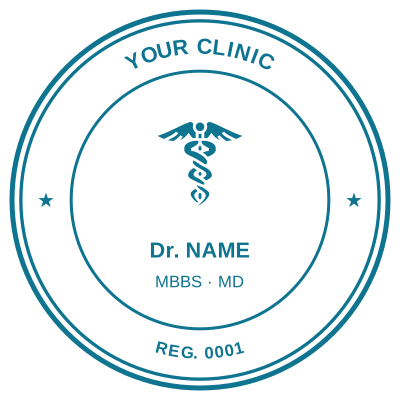
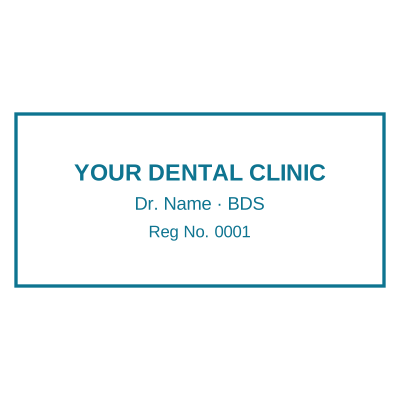

Open the stamp maker and start from any of these
A doctor's stamp is a small piece of professional identity that gets pressed onto other people's records, and that is exactly why the details on it matter more than the design. This is what belongs on one, what the different medical stamps are for, and how to make one that a pharmacy, an insurer or a records clerk will accept without a second look.
Everything here is about making your own stamp, for your own practice. A registration number is issued to a person by a council or a board, and only that person's stamp should carry it.
What goes on a doctor's stamp
Four lines do almost all the work, and the order is conventional rather than arbitrary.
1. The name, with the qualification. Dr A. N. Otieno, MBChB. The qualification belongs on the stamp because it is the part a records clerk checks against the prescription.
2. The registration or licence number. The number your council or board issued. This is the line that makes the mark verifiable, and the line people most often abbreviate wrongly. Put it exactly as it is registered.
3. The practice or facility. The clinic, hospital or practice the mark belongs to.
4. The date. On a prescription this is not decoration. It is what a pharmacy reads to decide whether the script is still valid, and it is the line that should be written in by hand or left to fill itself in rather than printed once and frozen.
A round seal suits the name and registration number, because ring text gives you two arcs to work with. A rectangle stamp suits four straight lines and is easier to read at speed. Neither is more official than the other.
The medical stamps that are actually different jobs
"Doctor stamp" covers several marks that do different things, and a practice usually needs more than one.
The prescriber's stamp. Name, qualification, registration number, and the date. The one that goes on scripts.
The practice or facility stamp. The clinic's own mark for letters, referrals and reports, closer to a company seal than to a personal one.
The certified true copy stamp stamp. For copying a patient's identity document or a report into a file, where the copy has to be attested rather than just photocopied.
The received or date stamp. For the records desk, marking when a result, a referral or a claim arrived. Given how often a claim turns on when something was received, this one deserves an accurate date more than any other.
Other clinical roles carry their own version of the same idea: a dentist stamp and a nurse stamp follow the same four lines with a different registration body on line two.
Making one, step by step
- Open the stamp maker and pick a shape. Round for a seal with the name curved around the ring, rectangle for four straight lines.
- Type the name and qualification, then the registration number. On a circle the curved ring text re-fits itself as you edit, so a long name does not need retyping.
- Add the practice name in the centre.
- Add the date. Leave it blank to write in by hand, or set it to print. A blank is usually right on a prescriber's stamp, since the stamp is used every day and a printed date is only correct on the day it was made.
- Add the clinic logo if there is one. Turning a logo into a stamp knocks the white background out so it lands as ink rather than as a white card.
- Check the preview at full size, then download.
Which file to take
Take the PNG that leaves the text underneath visible for almost everything. It drops onto a document with the page showing through, which matters on a form where the stamp overlaps a printed line.
Take the SVG if it is going to a printer or has to be resized later, and the Word file if you are stamping letters and referrals in Word, because it arrives already set to float over your text rather than pushing it down the page. The full breakdown of what each format is for is a page of its own.
If the document is a PDF, putting the stamp straight onto the PDF skips the print-and-scan round trip entirely.
What a stamp does not do
A doctor's stamp records that a document came from you. It does not prove who applied it, and no digital stamp changes that, ours included. Where a prescription or a report has to be proved rather than marked, the answer is the receiving body's own process.
Requirements for prescriptions, controlled drugs and medical records differ by country and by regulator, sometimes considerably. Confirm what applies where you practise rather than assuming a stamp settles it.
Read next: how to make a digital stamp, start to finish, and why a rotating date band shows the wrong date more often than anyone admits.
A closing note. This is a design tool and the page describes common practice rather than advising on what a given document needs. What a medical mark must carry, and whether an applied one is accepted, is set by the council or board you are registered with. Only make a mark for credentials you actually hold.
Every kind of stamp and seal
- Notary stamps and seals
- Rubber stamps
- Rubber stamp maker
- Self-inking stamps
- Office stamps
- Official stamps
- Company seals
- Corporate stamps and seals
- Company chops
- Seals for civil servants
- Justice and court stamps
- Legal and advocate stamps
- Certified true copy stamps
- Pharmacy stamps
- Veterinary stamps
- Engineer and architect seals
- Land surveyor seals
- Bank stamps
- School and principal stamps
- Teacher and marking stamps
- University and college seals
- Library stamps
- Inspection stamps
- Courier and logistics stamps
- Construction and site stamps
- Real estate stamps
- Hotel and restaurant stamps
- Church and charity seals
- Tender and bid stamps
- HR and payroll stamps
- Received and paid stamps
- Confidential and draft stamps
- Signature stamps
- Date stamps
- Custom band stamps
- Numbering stamps
- Address stamps
- Monogram stamps
- Wedding stamps
- Gift and craft stamps
- Art and logo stamps
- Wax and foil seals
- Stamp or seal, by profession